
Most developer tools still assume the human is the operator.
You read the documentation. You install the CLI. You decide where files should go. You copy commands from a README, paste them into a terminal, check the output, fix the path, and then explain the final state back to your AI coding agent.
That made sense when tools were only built for humans.
But AI coding agents now run commands, inspect files, follow project conventions, and repair broken local state. If a tool is meant to help agents, the better question is not:
How does a human use this CLI?
It is:
Can the agent operate the CLI by itself?
That is one of the quiet but important ideas behind aweskill: it is a CLI-first Skill package manager that AI agents can operate themselves.
Website: aweskill.webioinfo.top
The Old Workflow: You Manage the Agent’s Tools
When a new AI Agent needs a Skill, the usual workflow looks like this:
- You find the Skill.
- You download or copy it.
- You locate the agent’s Skill directory.
- You place
SKILL.mdin the right folder. - You restart the agent.
- You hope the next agent uses the same layout.
This is manageable once.
It becomes messy when you use Codex, Claude Code, Cursor, Gemini CLI, Windsurf, Qwen Code, OpenCode, or any other coding agent side by side. Each one has its own directory layout and conventions. The human becomes the package manager.
That is backward.
If the agent is already capable of editing your repo, running tests, and diagnosing failures, it should also be able to manage its own Skills.
The aweskill Workflow: Give the Agent a Protocol
aweskill provides a bootstrap document written for AI coding agents:
Read https://github.com/mugpeng/aweskill/blob/main/README.ai.md and follow it to install aweskill for this agent.That instruction is enough for a capable coding agent to do the initial setup.
The protocol tells the agent to:
- check that Node.js and npm are available
- install
aweskillglobally - initialize the central Skill store at
~/.aweskill/skills/ - detect the current agent runtime
- project the built-in
aweskillandaweskill-doctorSkills into that agent - verify the projection
- ask you to restart so the new Skills become active
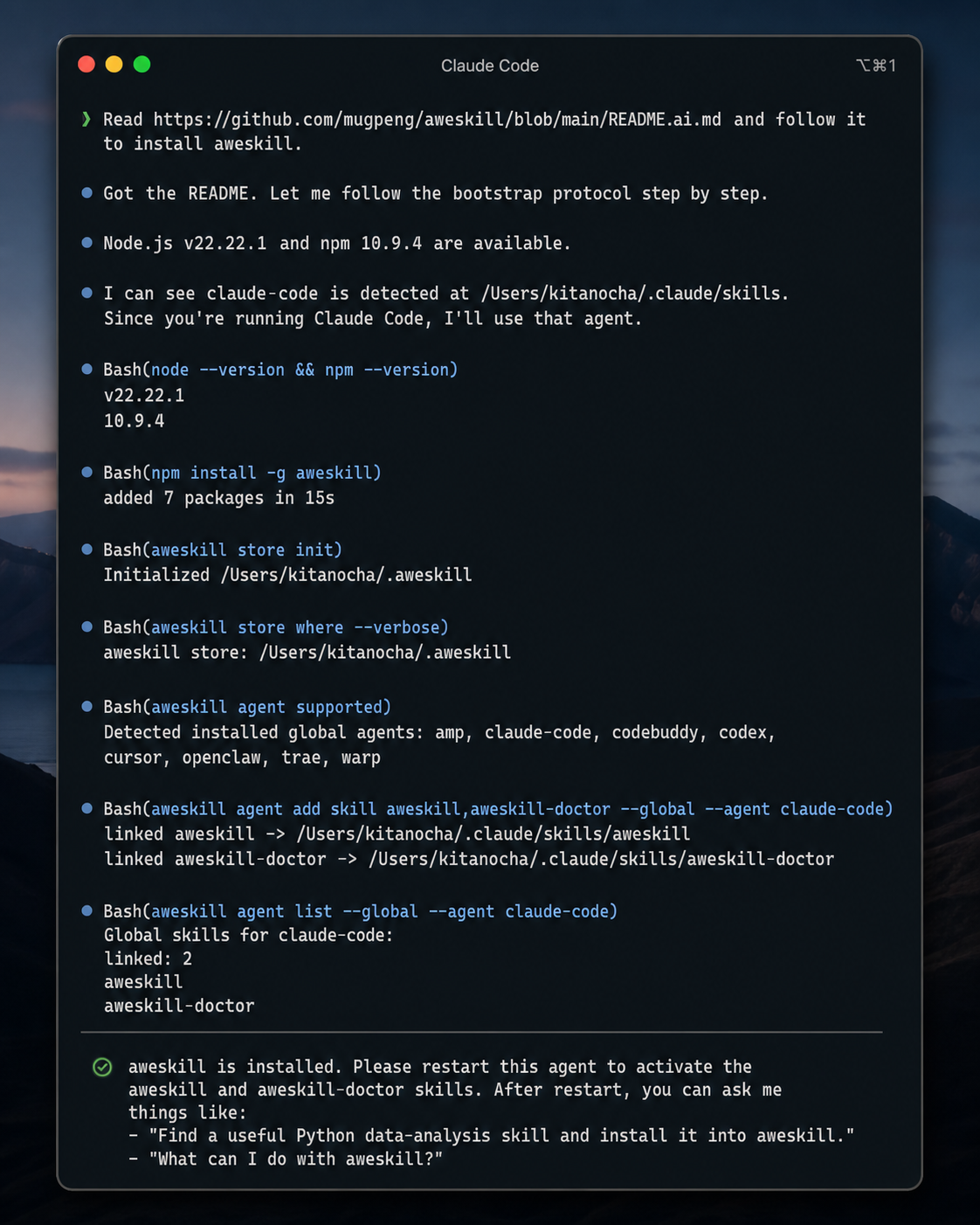
After that restart, you no longer have to remember every command. You can ask the agent in plain language.
What the Agent Can Do After Bootstrap
aweskill ships two built-in meta-Skills:
aweskill: routine Skill management, including search, install, update, bundles, and agent projectionaweskill-doctor: repair-first workflows, including sync checks, cleanup, deduplication, malformedSKILL.mdrepair, and recovery
Once these are projected into the current agent, the agent can translate natural-language requests into aweskill commands.
Instead of typing:
aweskill find review
aweskill install owner/repo
aweskill agent add skill pr-review --global --agent codex
You can say:
Find a good code-review Skill, install it into aweskill, and enable it for this agent.The agent can search, inspect results, choose an installable source, run the install, project the Skill, and verify the result.
That is the difference between a CLI that agents can call and a CLI that humans must babysit.
Use Case 1: Bootstrap a Fresh Agent
You open a new machine, a fresh terminal, or a newly installed coding agent. Instead of manually setting up its Skill directory, you give it one instruction:
Read README.ai.md from the aweskill repo and install aweskill for this agent.The agent follows the bootstrap protocol:
npm install -g aweskill
aweskill store init
aweskill store where --verbose
aweskill agent supported
aweskill agent add skill aweskill,aweskill-doctor --global --agent <agent-id>
aweskill agent list --global --agent <agent-id>
The important detail is that the protocol is conservative. If the agent cannot determine the correct agent-id, it should ask you instead of guessing. It should not project Skills to every installed agent by default.
That makes the bootstrap flow agent-friendly without being reckless.
Use Case 2: Ask the Agent to Find and Install a Skill
You are working on a Python data project and want a useful data-analysis Skill.
You do not need to browse registries yourself. You can ask:
Find a useful Python data-analysis Skill and install the best match into aweskill.The agent can run:
aweskill find python data analysisThen it can inspect the results, avoid unsupported discover-only entries, install the best available source, and report what it did:
aweskill install <source>If the Skill should be active in the current agent, the agent can project it:
aweskill agent add skill <skill-name> --global --agent <agent-id>The human stays in the loop for judgment. The agent handles the mechanical work.
Use Case 3: Build a Project Bundle by Conversation
Bundles are where agent-operated Skill management starts to feel natural.
Instead of remembering which Skills belong in a frontend project, you can ask:
Create a frontend bundle with the Skills we need for UI design, accessibility review, test-driven development, and release checks. Enable it for this agent.The agent can turn that into a sequence:
aweskill bundle create frontend
aweskill bundle add frontend frontend-design,accessibility-review,test-driven-development,release-checklist
aweskill agent add bundle frontend --global --agent <agent-id>
aweskill agent list --global --agent <agent-id>
The real value is not saving a few keystrokes. The value is that the agent can reason from the project context, select a relevant group of Skills, make the bundle repeatable, and verify that the current agent can use it.
Later, when you move the same project to another coding tool, the bundle is still there.
Use Case 4: Let the Agent Check for Updates
Skills age like any other dependency. Instructions change. Upstream authors fix bugs. Registries improve metadata. Local copies drift.
Instead of manually checking each Skill, you can ask:
Check whether any installed Skills have source updates, but do not change files yet.The agent can run:
aweskill update --checkThen it can summarize the result and ask before applying changes.
If you approve, it can run targeted updates:
aweskill update <skill-name>This is especially useful when you use the same Skill across Codex, Claude Code, Cursor, and Gemini CLI. The projected agents point back to the central store, so one updated source becomes available everywhere it is projected.
Use Case 5: Ask the Agent to Repair Skill State
Local Skill directories are not static. Agents update. Paths change. Symlinks break. Someone manually copies a folder into a managed directory. Another Skill has malformed frontmatter.
This is where aweskill-doctor matters.
You can ask:
Check whether this agent's Skills are broken, duplicated, or suspicious. Show me the report first.The agent can run read-only checks:
aweskill agent list --global --agent <agent-id>
aweskill doctor sync --global --agent <agent-id>
aweskill doctor clean
aweskill doctor dedup
aweskill doctor fix-skills
The repair commands are dry-run by default. The agent can inspect the report, explain the risk, and only apply changes when you explicitly approve:
aweskill doctor sync --global --agent <agent-id> --apply
aweskill doctor dedup --apply --backup
aweskill doctor fix-skills --apply --backup
This is the right division of labor: the agent diagnoses and prepares the repair; the human approves destructive or state-changing actions.
Use Case 6: Migrate a Working Setup to Another Agent
Suppose you have a good setup in Codex and now want a similar setup in Claude Code.
You can ask:
Look at the Skills and bundles available in aweskill, then project the daily coding setup into Claude Code.The agent can inspect the central store and bundles, then run:
aweskill agent supported
aweskill agent add bundle daily-coding --global --agent claude-code
aweskill agent list --global --agent claude-code
No manual copying. No guessing where Claude Code stores Skills. No stale folder fork.
One central store. One bundle. Another agent enabled.
Use Case 7: Back Up Before a Risky Change
Before a large cleanup or migration, you can ask:
Back up my aweskill store before making any Skill changes.The agent can run:
aweskill store backupThen it can proceed with the requested work. If something goes wrong, the central store can be restored instead of rebuilt from memory.
This is a small detail, but it changes the psychology of maintenance. You can let the agent help because the state is recoverable.
Why This Matters
Agent-operated tooling changes the shape of developer workflow.
The best tools for AI coding agents should be:
- documented for both humans and agents
- scriptable through a stable CLI
- conservative about destructive actions
- inspectable before applying changes
- easy to verify after each operation
- recoverable when local state drifts
aweskill is built around that model.
It is still useful as a normal human-operated CLI. You can run every command yourself. But the more interesting workflow is giving your agent enough structure to operate the tool safely on your behalf.
That is why README.ai.md exists.
That is why aweskill and aweskill-doctor are built-in Skills.
And that is why Skill management should not stay trapped in manual folder work.
Try It
If you want the fastest path, ask your current coding agent:
Read https://github.com/mugpeng/aweskill/blob/main/README.ai.md and follow it to install aweskill for this agent.After restart, try:
Find a useful testing Skill and install it into aweskill.Then:
Check whether this agent's Skill projection is healthy.If those three requests work, your agent is no longer just using Skills. It can help manage them.
Website: aweskill.webioinfo.top
Install: npm install -g aweskill
Agent bootstrap: README.ai.md
GitHub: github.com/mugpeng/aweskill