You use more than one AI coding agent. Claude Code for deep refactors. Cursor for quick edits. Codex for autonomous tasks. Gemini CLI for multimodal work. Maybe Windsurf or Qwen Code too.
Each one has its own skill directory. Each one expects SKILL.md files in a different place. And every time you find a useful skill, you copy it. Then copy it again. Then again.
A month later, one copy is outdated, one copy is broken, one has local edits nobody remembers making, and nobody knows which one is the real version.
That is the problem aweskill solves.
Website: aweskill.webioinfo.top
The Problem Is Not Day One — It Is Day Thirty
Installing a skill once into one agent is easy. Most tools handle that.
The hard problems show up later:
- Which copy is real? The same
pr-reviewskill exists in~/.claude/skills/,~/.cursor/skills/, and~/.codex/skills/. Which one do you edit? - How do you update? The upstream author shipped a fix. Now you need to find every copy and replace it.
- How do you organize? You have 15 skills. Some are for backend work, some for frontend. Some you only want in Codex, some everywhere.
- How do you recover? A symlink broke. An agent updated and wiped your skills directory. Now what?
- How do you avoid the copy spiral? Every new agent means another round of manual copying.
aweskill treats skills as a long-term local asset — not a one-time install target.
What Is aweskill?
aweskill is a local skill package manager for AI agents. Think of it as npm for your SKILL.md files.
It keeps one central skill store in ~/.aweskill/skills/, then projects selected skills into each agent's expected directory using symlinks (or junctions/copies on Windows).
Key Selling Points
| # | Feature | Why It Matters |
|---|---|---|
| 1 | Central Store | One copy of every skill in ~/.aweskill/skills/. No more scattered duplicates. |
| 2 | Multi-Agent Projection | Same skill, four agents, one command. Supports 47 agents. |
| 3 | Bundles | Group skills by workflow and project the whole set at once. |
| 4 | Source-Aware Updates | Records where each skill came from. Pulls upstream changes while protecting local edits. |
| 5 | Built-in Agent Skills | Ships meta-skills so AI agents can manage skills through natural language. |
| 6 | Local Maintenance | Backup, restore, dedup, clean, sync, recover — all in one CLI. |
| 7 | Website + Docs | aweskill.webioinfo.top gives install guides and agent compatibility. |
How It Compares
| Capability | cc-switch | sciskill | Skills Manager | skillfish | vercel-labs/skills | skills-manage | aweskill |
|---|---|---|---|---|---|---|---|
| Central local store | No | No | Yes | No | No | Yes | Yes |
| Registry discovery | No | Yes | No | Yes | Yes | Yes | Yes |
| GitHub repo import | Yes | No | No | Yes | Yes | Yes | Yes |
| Local-path import | No | No | No | No | Yes | No | Yes |
| Tracked updates | No | No | No | Yes | Yes | No | Yes |
| Multi-agent projection | Yes | No | Yes | Yes | Yes | Yes | Yes |
| Bundle grouping | No | No | No | Yes | No | Yes | Yes |
| Agent-callable skills | No | No | No | No | No | No | Yes |
| Local maintenance | No | No | No | No | No | No | Yes |
Bottom line: Other tools can install skills. aweskill manages the full lifecycle — discover, install, organize, update, maintain, and recover — across every agent you use.
Real-World Scenarios
Scenario 1: The Solo Developer Switching Agents Mid-Project
You start a feature in Claude Code. Halfway through, you switch to Cursor for the UI work. Then you use Codex to generate test cases. All three agents need the same pr-review and bug-triage skills.
Without aweskill:
- Copy
pr-review/SKILL.mdto~/.claude/skills/pr-review/ - Copy again to
~/.cursor/skills/pr-review/ - Copy again to
~/.codex/skills/pr-review/ - Repeat for
bug-triage - Hope they stay in sync
With aweskill:
aweskill agent add skill pr-review,bug-triage --global --agent claude-code
aweskill agent add skill pr-review,bug-triage --global --agent cursor
aweskill agent add skill pr-review,bug-triage --global --agent codex
One source. Three projections. Zero copies.
Scenario 2: The Team Lead Building Standard Skill Sets
Your team uses Claude Code and Cursor. You want every team member to have the same core skills: code review, testing guidelines, API design conventions, and release checklists.
Without aweskill: Share a Google Doc listing which skills to install manually. Nobody does it consistently.
With aweskill:
aweskill bundle create team-standard
aweskill bundle add team-standard pr-review,test-guidelines,api-design,release-checklist
aweskill agent add bundle team-standard --global --agent claude-code
aweskill agent add bundle team-standard --global --agent cursor
Now any team member runs the same two commands and gets the identical skill set. The bundle definition is a simple YAML file you can commit to a shared repo.
Scenario 3: The Upstream Skill Author Who Ships Updates
You downloaded a security-review skill from skills.sh. The author just published an improved version with OWASP 2025 coverage.
Without aweskill: Hunt through four agent directories, download the new version, manually replace each copy, pray you didn't miss one.
With aweskill:
aweskill update --check           # See what has updates
aweskill update security-review   # Pull the update into central store
All projected agents pick up the change automatically — they point to the same central copy.
Scenario 4: The Researcher Using Scientific Skills
You found a proteomics analysis skill on sciskillhub.org and want it available in both Gemini CLI and Claude Code.
aweskill find proteomics
aweskill install sciskill:open-source/research/lifesciences-proteomics
aweskill agent add skill lifesciences-proteomics --global --agent gemini-cli
aweskill agent add skill lifesciences-proteomics --global --agent claude-code
One install. Multiple agents. Source tracked for future updates.
Scenario 5: Disaster Recovery
An agent update wiped your ~/.cursor/skills/ directory. All your carefully curated skills are gone.
Without aweskill: Start over. Re-download everything. Rebuild your setup from memory.
With aweskill:
aweskill store backup                          # You ran this last week
aweskill store restore ~/Downloads/aweskill-backup.tar.gz
aweskill agent add bundle daily-coding --global --agent cursor
Central store restored. Bundle re-projected. Back to work.
Install aweskill by asking your agent
One of the cleanest parts of the workflow is that you do not need to perform the bootstrap manually. You can hand the protocol to your coding agent directly:
Read https://github.com/mugpeng/aweskill/blob/main/README.ai.md and follow it to install aweskill.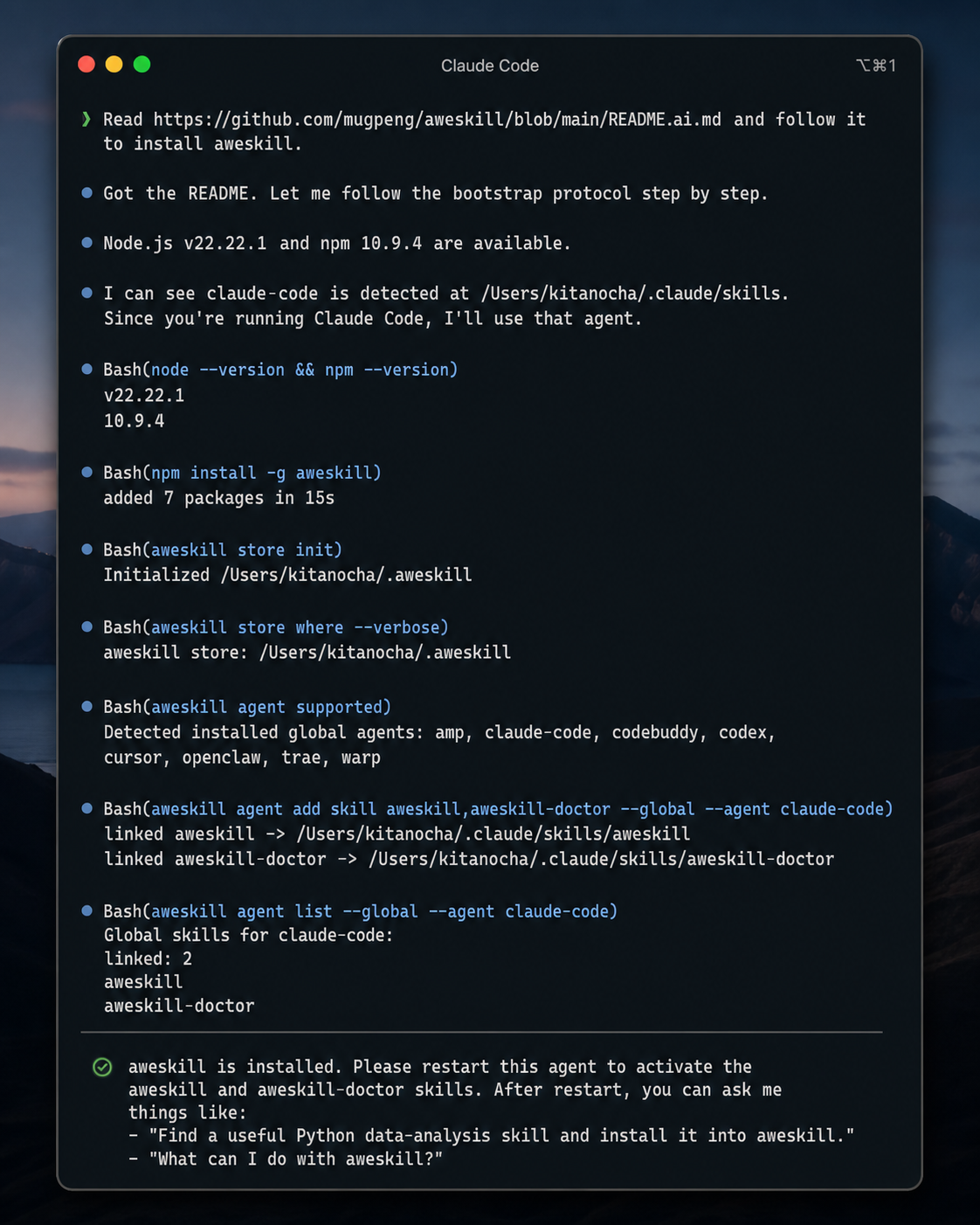
In one pass, the agent can install the CLI, initialize the central store, detect the current runtime, project aweskill and aweskill-doctor, and then tell you to restart so the new skills become active.
Getting Started
Install:
npm install -g aweskill
aweskill store init
Find and install a skill:
aweskill find pr-review
aweskill install owner/repo
Project it everywhere:
aweskill agent add skill pr-review --global --agent claude-code
aweskill agent add skill pr-review --global --agent codex
aweskill agent add skill pr-review --global --agent cursor
aweskill agent add skill pr-review --global --agent gemini-cli
Or use a bundle for the whole set:
aweskill bundle create daily-coding
aweskill bundle add daily-coding pr-review,bug-triage,release-checklist
aweskill agent add bundle daily-coding --global --agent claude-code
aweskill agent add bundle daily-coding --global --agent cursor
Other Tools Worth Knowing
aweskill is the best fit when you want one repairable local skill system across multiple agents. But the surrounding ecosystem is getting better, and a few adjacent tools are worth recommending for different jobs:
- skills-manage: a good choice when you want visual skill management. It emphasizes a central library, marketplace browsing, GitHub import, collections, and per-platform installs in a desktop UI.
- cc-switch: useful when your main problem is switching API providers, model endpoints, and related local AI tool configuration, not just managing skills.
- sciskill: useful when you specifically want to discover and download scientific or bioinformatics-oriented skills collected by the
sciskillhubregistry workflow. - vercel-labs/skills: a strong entry point when you want a popular open skills CLI and prefer browsing skills through the broader
skills.shecosystem.
Let AI Agents Manage Their Own Skills
aweskill ships two built-in meta-skills. Project them into your current agent first:
aweskill agent supported
aweskill agent add skill aweskill,aweskill-doctor --global --agent codex
aweskill agent list --global --agent codex
Replace codex with your agent id.
Your AI agent can respond to requests like:
- "Install the latest pr-review skill for all my agents"
- "Check if any skills have updates"
- "Clean up duplicate skills in the store"
- "Backup my skill store"
The agent runs aweskill commands on your behalf. This turns aweskill from a tool you manage into a tool your agents can self-manage.
47 Agents and Counting
aweskill currently supports 47 AI coding agents:
Claude Code, Cursor, Windsurf, Codex, GitHub Copilot, Gemini CLI, OpenCode, Goose, Amp, Roo Code, Kiro CLI, Kilo Code, Trae, Cline, Antigravity, Droid, Augment, OpenClaw, CodeBuddy, Crush, Kode, Mistral Vibe, Mux, OpenClaude IDE, OpenHands, Qoder, Qwen Code, Replit, Neovate, AdaL, and more.
See the full list in the README.
When to Use aweskill
Use aweskill if you:
- Use more than one AI coding agent
- Want one local source of truth for skills
- Need the same skills available across Claude Code, Cursor, Codex, Gemini CLI, and others
- Want reusable bundles instead of ad-hoc copying
- Care about tracked updates and recoverable local state
- Want your AI agents to manage skills via natural language
You might not need it if:
- You only use one agent and never plan to switch
- You install skills once and never touch them again
The Bottom Line
Installing a skill is not the hard part. Keeping it updated, organized, consistent across agents, and recoverable when things break — that is the hard part.
aweskill solves the day-thirty problem. One central store. Multi-agent projection. Source-tracked updates. Bundle organization. Built-in maintenance. Agent-callable management.
If you work across multiple AI agents, aweskill turns scattered skill folders into something you can actually manage.
Website: aweskill.webioinfo.top • Install: npm install -g aweskill • GitHub: mugpeng/aweskill